Introduction
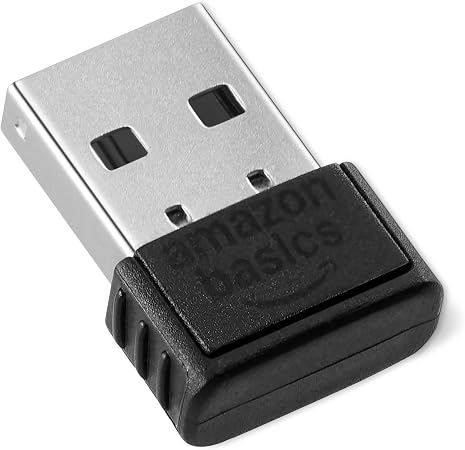
In today’s connected world, having a seamless wireless experience is essential. However, not all devices are equipped with Bluetooth capabilities, leaving users stuck with unsightly cables. This is where the Amazon Basics Bluetooth 5.4 USB Adapter Dongle steps in. It promises to convert non-Bluetooth devices into Bluetooth-capable ones with a simple USB connection, ushering in a new era of connectivity for your PC accessories such as mice and keyboards. The small stature of this gadget ensures that it blends into your setup perfectly without getting in the way.
Pros & Cons
- Pros:
- Compatible with Bluetooth 5.4 and backward-compatible with previous versions
- Supports multi-device connection for up to 6 devices simultaneously
- Plug-and-play with Windows 11, 10, and 8.1
- Offers enhanced data transfer speed due to EDR technology
-
Low energy consumption
-
Cons:
- Not compatible with operating systems other than Windows 8.1, 10, and 11
- Does not support macOS, Linux, or gaming consoles such as PlayStation
- Built-in device Bluetooth must be disabled before usage
- Lack of support for older Windows versions (7 and below)
Comparison
When pitted against other USB Bluetooth dongles on the market, the Amazon Basics Bluetooth 5.4 USB Adapter holds its ground with impressive features like low energy consumption and multi-device connection. However, where this adapter shines is its compact and minimalist design that seamlessly integrates with your device's aesthetics. Some competing products offer broader OS compatibility, which may be preferable for users with diverse device ecosystems. Yet, for Windows PC users focused on connecting peripherals like keyboards and mice, this dongle is a competent and cost-effective choice.
User Tips / Usage Guide
- Disable Existing Bluetooth: Ensure that any built-in Bluetooth functionality on your device is disabled to prevent interference.
- Driver Installation: For optimal performance, visit the Amazon Basics support page to ensure your drivers are up to date.
- Connect Multiple Devices: To connect multiple devices, follow sequential connection steps as outlined in the user manual to avoid overlaps.
- Optimize Connection: Position your devices within a reasonable range to maintain a stable and strong connection.
- Energy Management: Make use of Bluetooth low energy features to keep power consumption minimal without sacrificing performance.
- Secure Usage: Ensure a secure Bluetooth connection by utilizing compatible security settings through your PC.
- Regular Updates: Keep your Windows operating system updated to take advantage of any improvements to Bluetooth support.
- Unplug When Not in Use: Extend the lifespan of the dongle by unplugging it when not actively used.
Conclusion
Overall, the Amazon Basics Bluetooth 5.4 USB Adapter Dongle embodies an efficient solution for users aiming to extend the wireless capabilities of their PCs in a hassle-free manner. The attention to detail here is notable, particularly in its ability to connect multiple devices while conserving energy. While its OS compatibility might limit its audience, for dedicated Windows users, this dongle delivers on its promises of enhanced performance and connectivity. If you're seeking a straightforward, reliable method to augment your device's capabilities, this adapter comes highly recommended for its quality build and intuitive design.